

Sign users in
Your app signs its users in; the package never does. Every request names your app by its key, and the user by a token. PurrCRM offers three ways to sign users in, all on Settings › Connect › Sign-in. An app can use more than one at once, for example while it moves from one to another.
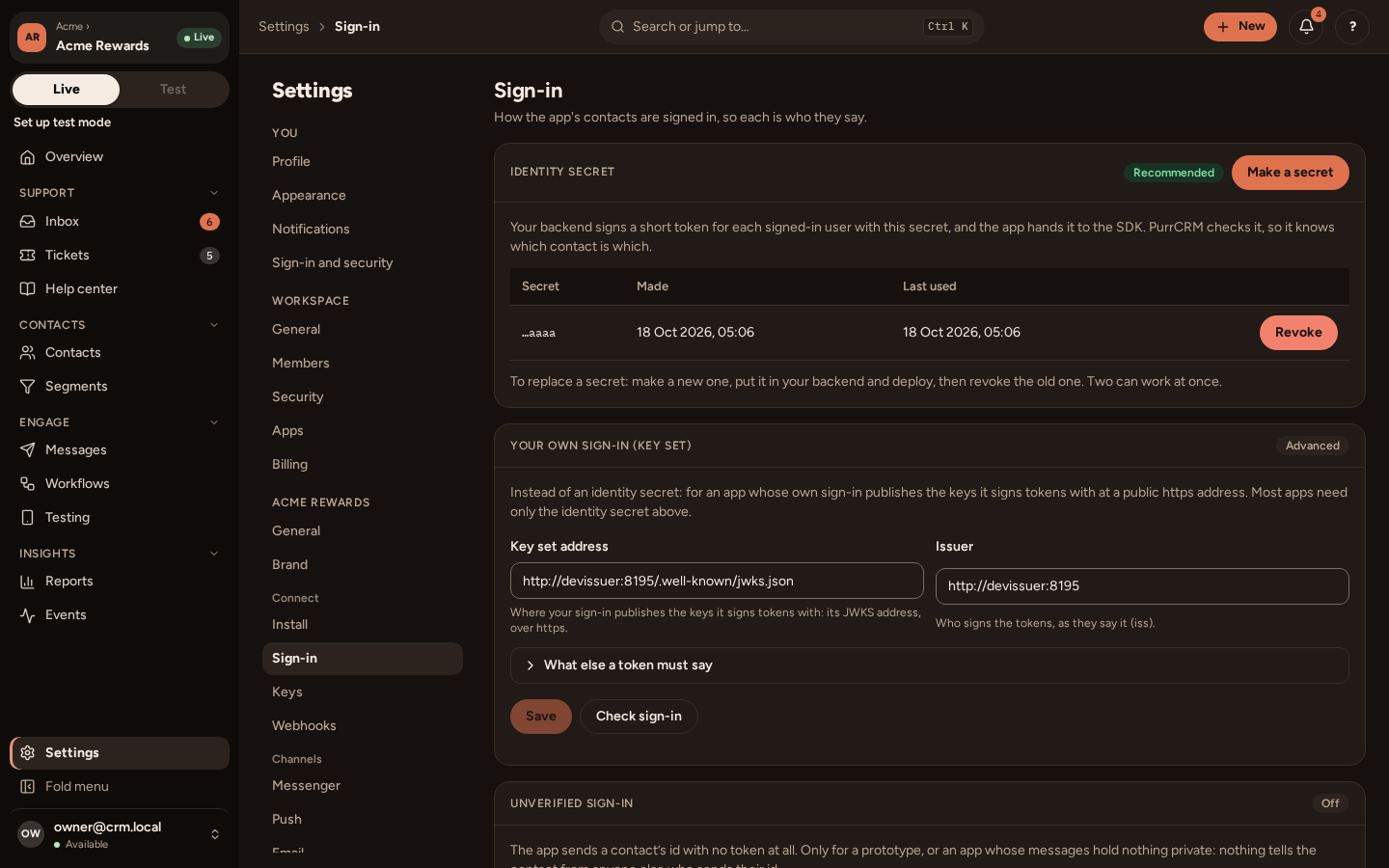
With an identity secret (recommended)
Section titled “With an identity secret (recommended)”- On the Sign-in tab, press Make a secret (
crm_is_…). It is shown once. Keep it in your backend’s secrets, never in the app. - Your backend signs a short token for the signed-in user with it.
- Your app asks your backend for the token, and hands it to the package.
On your backend
Section titled “On your backend”Sign an HS256 token with the user’s id as sub, and an exp minutes or hours away (more than 30 days is refused). Include iat too. If your Sign-in tab names an issuer, an audience or a kind, add them as iss, aud and knd. Serve the token to your app from a route of your own, such as /crm-token, for the user signed in.
The code, in Node, Python, Go, PHP and Ruby, and a route that serves it, is on Sign users in under Web app and backend: the token is the same for an app and a website.
CRM_IDENTITY_SECRET is your own variable: name it as you like. The user’s id must be the same one your backend uses for them in Identify, so that what the app and the backend say about a person ends up on one contact.
In your app
Section titled “In your app”CrmFetchedTokens asks your backend for the token whenever it needs one:
final tokens = CrmFetchedTokens(() async {  final answer = await myBackend.get('/crm-token'); // signed by your backend  if (answer == null) return null; // nobody is signed in  return CrmFetchedToken(answer['token'] as String);});
final crm = Crm(config: config, auth: CrmAuth.tokens(tokens));
It keeps the token until a minute before its exp, fetches once for every request waiting on one, and fetches a new one when PurrCRM says it has expired. A phone whose clock is wrong does not make it fetch for every request: it times the token by its own exp less iat, which is why you should sign an iat. If your backend says when the token expires, pass it: CrmFetchedToken(token, expiresAt: ...).
Replacing a secret
Section titled “Replacing a secret”Two secrets can work at once. Make a new one, deploy your backend with it, watch the old one’s Last used stop moving, then Revoke it. Revoke a secret that may have leaked at once: its users are refused until your backend signs with the new one.
Tell the package who is signed in
Section titled “Tell the package who is signed in”When your user has signed in, and is past your own first steps (onboarding, permission screens):
crm ..session(CrmSession(guestId: user.id, displayName: user.name)) ..setReady(true);When they sign out:
await crm.forgetPushToken(); // while their token still works, see Pushtokens.forget();crm ..setReady(false) ..session(null);guestId is the user’s id in your app (the token’s sub). Until setReady(true), no in-app message is shown and a tapped push’s page waits. Call it again whenever that changes. CrmSession(productEventsOff: true) records no product events for a user who turned them off in your settings.
With your own sign-in’s key set (advanced)
Section titled “With your own sign-in’s key set (advanced)”If your sign-in already issues tokens and publishes its signing keys (a JWKS at a public https address, with EdDSA, RS256 or ES256), name its issuer, key set address, audience, kind and subject claim on the Sign-in tab, and press Check sign-in. Hand the package those tokens through your own CrmTokens:
final class NorthwindTokens implements CrmTokens {  @override  Future<String?> current() async {    // The token for the user signed in, refreshed when it has run out;    // null for nobody.  }
  @override  Future<void> expired(String token) async {    // PurrCRM refused [token] as expired: forget it, so the next current()    // gets a new one. The request is then asked once more.  }}
Several requests may ask at once: get one fresh token for all of them, not one each. If current() cannot answer, throw: the request fails without being sent, as CrmOffline unless CrmAuth.tokens(tokens, tokenFailure: ...) says otherwise.
Unverified sign-in (prototypes only)
Section titled “Unverified sign-in (prototypes only)”An app whose team turned on Unverified sign-in takes the user’s id with no token:
Crm(config: config, auth: CrmAuth.unverified(() => currentUserId));When a user is refused
Section titled “When a user is refused”Paste one of your backend’s tokens into Test a token on the Sign-in tab. It says which contact the token signs in, or exactly why it is refused: signed with no secret of the app’s, a revoked one, expired, too long, the wrong iss, aud or knd, or no sub.
A token that can never work (the wrong way, too long) is refused with that sentence, which the package writes to the log, and it does not ask again. A token whose signature or time is wrong is refused as expired, and the package asks your backend for a new one, once.
An app that is switched off
Section titled “An app that is switched off”When your team archives or deletes the app, PurrCRM refuses every request from it, and the package reads that as CrmAppUnavailable. It is final for the life of that Crm: nothing more is sent, the messenger says the chat is not available, queued events are dropped, and the facade’s own calls answer as for any failure, so nothing throws into your app. Restoring the app brings it back at the next launch.
Push.