

From a website or web app
The guest API is what the Flutter SDK uses, and your website or web app can call it straight from the browser: to show a user their conversations and let them write to you, to search your help center, to list their notices, and to record what they do.
It takes three steps:
- Name your website in Web origins, so PurrCRM lets its pages call the app.
- Give each signed-in user a token, signed by your backend.
- Call the guest API with
fetch.
Web origins
Section titled “Web origins”A browser only lets a page read an answer from another site when that site says it may (CORS). PurrCRM says so for the sites you name, and for no others.
On Settings › Connect › Install, under Web origins, write each site that calls the app, one a line, then press Save:
https://www.example.comhttps://app.example.com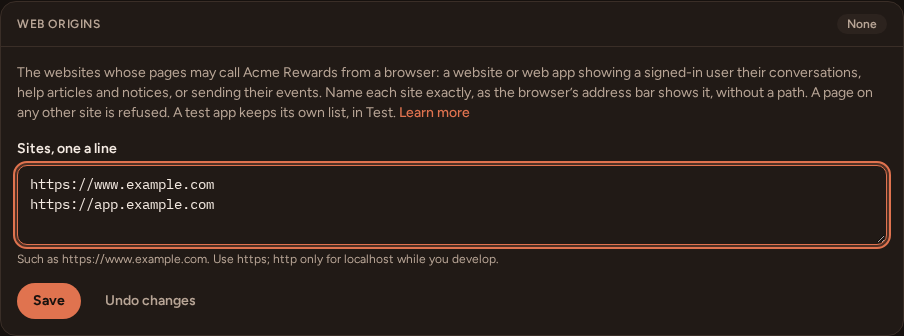
- Write the site as the browser’s address bar shows it:
https://, the host, and a port only if it is not the usual one. Leave out any path. - Each site is matched exactly.
https://example.comdoes not coverhttps://www.example.com, and there are no wildcards. - Use
https. While you develop,http://localhost(with any port) works too. - Live and Test keep separate lists. Switch to Test at the top of Settings to name your staging site for the test app.
- An app can have up to 20.
Pages on those sites may then call every guest route (/guest/v1/…) and read the app’s public details (GET /public/v1/apps/{key}). PurrCRM answers the browser’s preflight, and lets the page send Authorization, X-CRM-App-Key, Content-Type, X-Crm-Sdk and Idempotency-Key. It never accepts cookies: the user’s token travels in Authorization.
A page on any other site gets nothing back, and the server API (/server/v1/) is never open to a browser. Keep server keys on your servers.
Sign the user in
Section titled “Sign the user in”Each request names the signed-in user with a short token that your backend signs with the app’s identity secret. The secret never reaches the browser. Sign users in shows how to make the secret and sign the token, in several languages.
Give the signed-in user their token from a route of your own, behind your own sign-in. With Express and jsonwebtoken, where requireSignedIn is your own sign-in’s check and req.user the user it found:
import express from "express";import jwt from "jsonwebtoken";
const app = express();
app.get("/crm-token", requireSignedIn, (req, res) => {  const token = jwt.sign({ sub: String(req.user.id) }, process.env.CRM_IDENTITY_SECRET, {    algorithm: "HS256",    expiresIn: "1h",  });  res.set("Cache-Control", "no-store").json({ token });});
sub is your own id for the user, the same external id your backend uses with the server API, so what the website and your backend say ends up on one contact.
The page asks for the token on your own site, so your usual session cookie signs it in. Keep the token while it lasts, and ask for a new one when PurrCRM answers 401 with the code token_expired.
Every request
Section titled “Every request”Every guest request carries:
| Header | Value |
|---|---|
X-CRM-App-Key | Your app’s key, from Settings › Connect › Install (app_…, or app_test_… for the test app). It names the app; it is not a secret. |
Authorization | Bearer <token>: the signed-in user’s token. |
Accept-Language | The user’s language, optional. |
A small helper keeps the examples short. It fetches the token once, keeps it, and fetches a new one when the old one has expired:
const CRM = "https://app.purrcrm.com";const APP_KEY = "app_..."; // from Settings › Connect › Install
let token = null;
// The user's token, from your own backend (see "Sign the user in").async function userToken(fresh = false) {  if (token && !fresh) return token;  const res = await fetch("/crm-token");  if (!res.ok) throw new Error("not signed in");  token = (await res.json()).token;  return token;}
export async function crm(path, { method = "GET", body, headers = {} } = {}, retried = false) {  const res = await fetch(`${CRM}${path}`, {    method,    headers: {      "X-CRM-App-Key": APP_KEY,      Authorization: `Bearer ${await userToken(retried)}`,      "Accept-Language": navigator.language,      ...(body ? { "Content-Type": "application/json" } : {}),      ...headers,    },    body: body ? JSON.stringify(body) : undefined,  });  if (res.status === 204) return null;  const data = await res.json();  if (res.status === 401 && data.code === "token_expired" && !retried) {    return crm(path, { method, body, headers }, true);  }  if (!res.ok) throw Object.assign(new Error(data.detail ?? data.title), { problem: data });  return data;}
The examples below import it:
import { crm } from "./crm.js";The messenger
Section titled “The messenger”The messenger’s home: the greeting, the reply time, the cards your team published, open conversations, featured articles and the help bot’s opening.
const home = await crm("/guest/v1/messenger");console.log(home.unread, home.layout?.greeting, home.open.length);Conversations
Section titled “Conversations”Start one with the user’s first message. Send an Idempotency-Key of your own (a UUID) so that sending it again after a timeout starts it only once:
const started = await crm("/guest/v1/conversations", { method: "POST", headers: { "Idempotency-Key": crypto.randomUUID() }, body: { text: "Can I change my order before it ships?" },});const id = started.id;List the user’s conversations, newest first, a page at a time:
const page = await crm("/guest/v1/conversations?limit=20");for (const c of page.items) console.log(c.id, c.preview, c.unread);// Older ones: crm(`/guest/v1/conversations?before=${page.next_before}`)Read one, write in it, and mark it read:
const conversation = await crm(`/guest/v1/conversations/${id}`);await crm(`/guest/v1/conversations/${id}/messages`, { method: "POST", body: { text: "Thanks!" } });await crm(`/guest/v1/conversations/${id}/read`, { method: "POST", body: { seq: conversation.last_seq } });While a conversation is on screen, wait for replies with a long poll. It answers as soon as there is something newer than after, or after about 25 seconds with nothing new. Ask again straight away:
let after = conversation.last_seq;while (document.visibilityState === "visible") { const update = await crm(`/guest/v1/conversations/${id}/wait?after=${after}`); for (const part of update.parts) console.log(part.author?.name, part.blocks); after = update.last_seq;}The user’s tickets are at /guest/v1/tickets and /guest/v1/tickets/{ticket_id}.
Events
Section titled “Events”Send a batch of what the user did, up to 50 events, with platform set to web. Each event has an id you make (a UUID), so a batch sent twice is kept once.
const sent = await crm("/guest/v1/events", { method: "POST", body: { app_version: "web-2026.10", platform: "web", time_zone: Intl.DateTimeFormat().resolvedOptions().timeZone, sent_at: new Date().toISOString(), events: [ { id: crypto.randomUUID(), name: "table_booked", occurred_at: new Date().toISOString(), props: { party_size: "4" }, }, ], },});console.log(sent.accepted, sent.rejected ?? []);It answers 202 with how many were kept (accepted) and, when some were refused, which and why (rejected, left out when there are none). An event older than a week is refused. platform is ios, android or web; reports and filters show web events apart. An event your app has not defined yet is accepted and listed on the Data page for review, unless the app keeps strict data (Data). Props are strings.
The help center
Section titled “The help center”const { items } = await crm("/guest/v1/collections");const results = await crm(`/guest/v1/articles?q=${encodeURIComponent("points")}`);const slug = results.items[0]?.slug;if (slug) { const article = await crm(`/guest/v1/articles/${slug}`); await crm(`/guest/v1/articles/${slug}/rating`, { method: "POST", body: { helpful: true } });}For readers who are not signed in, PurrCRM hosts a public help center of its own, and your backend can read the public articles under /public/v1/help/ with only the app key. Those public routes are not open to browsers on other sites.
Notices
Section titled “Notices”Every push PurrCRM sends is also a notice in the user’s inbox. List them for a bell, and mark them read:
const inbox = await crm("/guest/v1/notices?limit=20");console.log(inbox.unread, inbox.notices.map((n) => n.title));if (inbox.unread > 0) { await crm("/guest/v1/notices/read", { method: "POST", body: { all: true } });}To mark only some read, send their ids instead: { ids: ["…"] }.
The app’s public details
Section titled “The app’s public details”GET /public/v1/apps/{key} needs no token. It answers the app’s name, colour and logo, which parts are switched on, and its languages, so a page can show your brand before anyone signs in:
const app = await (await fetch(`https://app.purrcrm.com/public/v1/apps/app_...`)).json();console.log(app.brand.name, app.features);In-app messages
Section titled “In-app messages”POST /guest/v1/checkin answers the in-app messages waiting for the user, and POST /guest/v1/receipts says what they did with each. The Flutter SDK draws these. A web app that wants to show them itself finds the bodies in the reference.
When it does not work
Section titled “When it does not work”- The browser console says the request was blocked by CORS. The page’s site is not in Web origins for this app, or is written differently (
www, a port,httpinstead ofhttps). Check you are on Live or Test as you meant: each has its own list. 401with codetoken_expired. Fetch a new token and try once more, as the helper does.401with codeunauthorized. The token can never work as it is: signed with the other mode’s secret, or with nosub. Thedetailsays why.429. The user sent too many requests. Wait forRetry-Afterseconds, which the page can read.
Every route
Section titled “Every route”The guest API reference lists every route, with every field it takes and answers.