

From your backend
Your backend knows things the app does not: who people are, what they paid, when they cancelled. The server API lets it tell PurrCRM, and erase or export a person when they ask.
Make a server key
Section titled “Make a server key”On Settings › Connect › Keys, press Make a key. It is shown once (crm_sk_…): keep it in your backend’s secrets. The tab then shows a ready-to-run curl for each call below, with your key and address filled in, and Recent errors for each key.
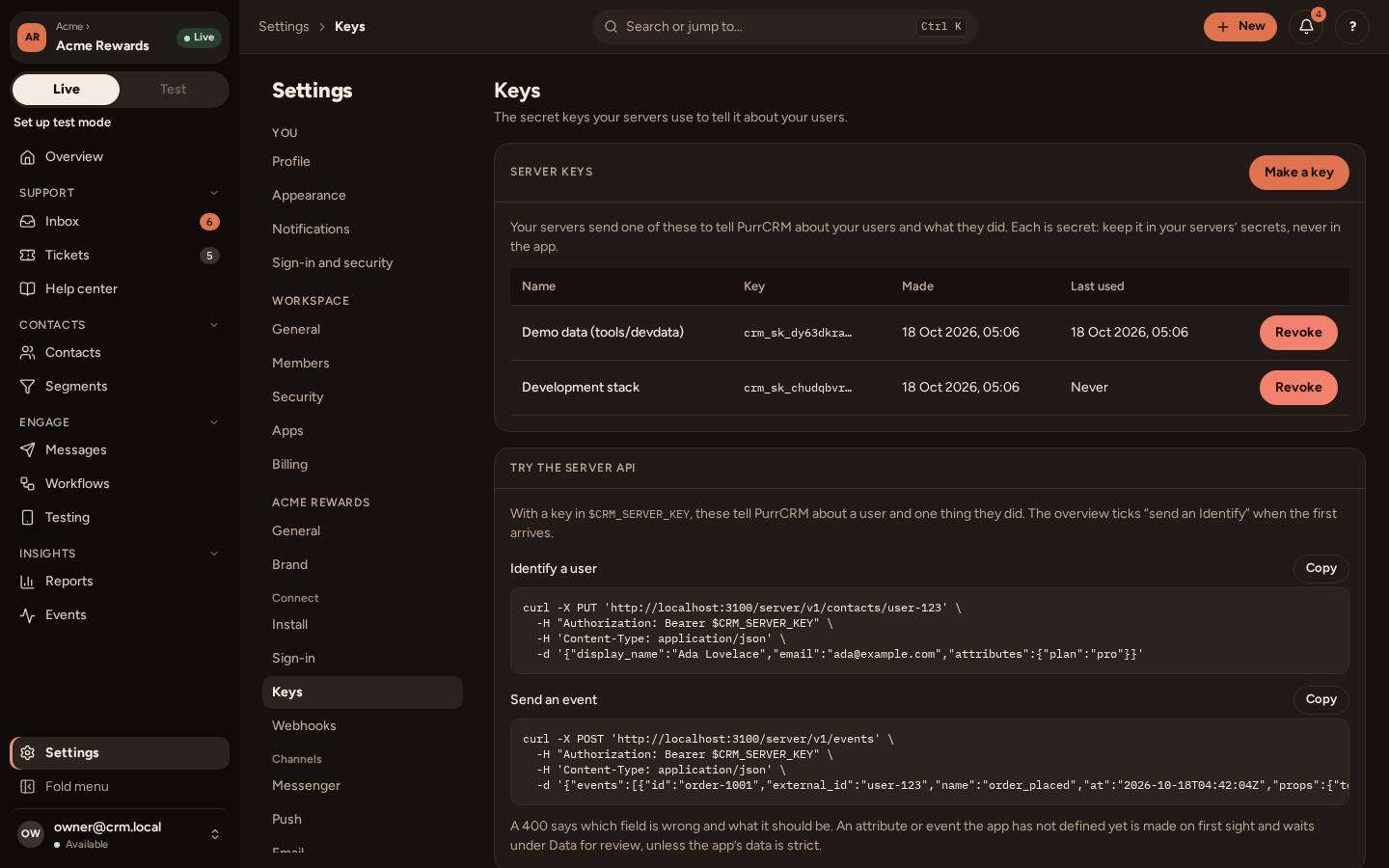
Every request carries it:
Authorization: Bearer crm_sk_...Content-Type: application/jsonEach key can make 1,200 requests a minute. An app has at most 20 keys. To replace one: make a new one, deploy it, then Revoke the old one. A test app has keys of its own (crm_sk_test_…), which open only it.
The examples read the key from an environment variable of your own, CRM_SERVER_KEY, and each one runs as it is:
- curl: in a shell.
- Node: Node 18 or later, saved as a
.mjsfile, thennode identify.mjs. It uses Node’s ownfetch. - Python: Python 3 with
pip install requests, thenpython identify.py. - Go: Go 1.22 or later, standard library only:
go run identify.go.
Identify a person
Section titled “Identify a person”PUT /server/v1/contacts/{external_id} says who a person is. The external id is your own id for them, the same one their tokens carry as sub, so what the app and your backend say ends up on one contact.
curl -X PUT "https://app.purrcrm.com/server/v1/contacts/user-123" \ -H "Authorization: Bearer $CRM_SERVER_KEY" \ -H "Content-Type: application/json" \ -d '{"display_name":"Ada Lovelace","email":"ada@example.com","attributes":{"plan":"pro"}}'const res = await fetch("https://app.purrcrm.com/server/v1/contacts/user-123", { method: "PUT", headers: { Authorization: `Bearer ${process.env.CRM_SERVER_KEY}`, "Content-Type": "application/json", }, body: JSON.stringify({ display_name: "Ada Lovelace", email: "ada@example.com", attributes: { plan: "pro" }, }),});if (!res.ok) throw new Error(`${res.status}: ${await res.text()}`);const { external_id, created } = await res.json();console.log(external_id, created);import osimport requests
res = requests.put( "https://app.purrcrm.com/server/v1/contacts/user-123", headers={"Authorization": f"Bearer {os.environ['CRM_SERVER_KEY']}"}, json={ "display_name": "Ada Lovelace", "email": "ada@example.com", "attributes": {"plan": "pro"}, }, timeout=10,)res.raise_for_status()print(res.json())package main
import ( "bytes" "encoding/json" "fmt" "io" "log" "net/http" "os")
func main() { body, _ := json.Marshal(map[string]any{ "display_name": "Ada Lovelace", "email": "ada@example.com", "attributes": map[string]any{"plan": "pro"}, }) req, err := http.NewRequest(http.MethodPut, "https://app.purrcrm.com/server/v1/contacts/user-123", bytes.NewReader(body)) if err != nil { log.Fatal(err) } req.Header.Set("Authorization", "Bearer "+os.Getenv("CRM_SERVER_KEY")) req.Header.Set("Content-Type", "application/json") res, err := http.DefaultClient.Do(req) if err != nil { log.Fatal(err) } defer res.Body.Close() answer, _ := io.ReadAll(res.Body) fmt.Println(res.Status, string(answer))}It answers {"external_id": "user-123", "created": true}.
Only what you send changes. A field you leave out keeps its value; one sent empty (or an attribute sent null) clears it. It makes the contact the first time, and is safe to send again. Send one whenever what it says changes, and once for everyone who was there before you started (a backfill, at a pace that leaves room in the key’s budget).
| Field | What it is |
|---|---|
display_name | What they are called, at most 100 characters. |
email | The address PurrCRM emails. |
signed_up_at | When they made their account. |
language | Their language, such as en or pt-BR (Languages). |
time_zone | Their time zone, such as Europe/London. |
provider | How they sign in: apple, google, password, or a word of your own. |
consent | Their consent to offers: see below. |
attributes | Your own attributes, by name: text, numbers, true/false, dates, or lists of text. A new one is accepted on first sight unless the app has strict data on (Data). |
Consent
Section titled “Consent”{ "consent": { "offers_by_email": true, "offers_by_push": false, "changed_at": "2026-10-18T09:30:00Z" }}offers_by_email and offers_by_push are each channel’s own switch, above every topic (Consent and topics). Send them only when the person changes them, with changed_at, the time they did: PurrCRM takes the newer choice, so your copy never turns back on someone who unsubscribed by email since. Without changed_at, a “no” is always taken and a “yes” is ignored if the person last said no in PurrCRM.
Declare your events
Section titled “Declare your events”PUT /server/v1/event-definitions declares the events your app sends, so the list lives with your code. Run it from your deploy, before the events are sent: an event sent before it is declared is made on first sight, with each prop’s type guessed from the first value (4250 reads as a number, not money), and a later declaration cannot change a type.
curl -X PUT "https://app.purrcrm.com/server/v1/event-definitions" \ -H "Authorization: Bearer $CRM_SERVER_KEY" \ -H "Content-Type: application/json" \ -d '{"definitions":[{"name":"order_placed","description":"A guest placed an order.","category":"commerce","source":"server","props":[{"key":"total","type":"money"}]}]}'const res = await fetch("https://app.purrcrm.com/server/v1/event-definitions", { method: "PUT", headers: { Authorization: `Bearer ${process.env.CRM_SERVER_KEY}`, "Content-Type": "application/json" }, body: JSON.stringify({ definitions: [ { name: "order_placed", description: "A guest placed an order.", category: "commerce", source: "server", props: [{ key: "total", type: "money" }], }, ], }),});if (!res.ok) throw new Error(`${res.status}: ${await res.text()}`);console.log(await res.json());import osimport requests
res = requests.put( "https://app.purrcrm.com/server/v1/event-definitions", headers={"Authorization": f"Bearer {os.environ['CRM_SERVER_KEY']}"}, json={"definitions": [{ "name": "order_placed", "description": "A guest placed an order.", "category": "commerce", "source": "server", "props": [{"key": "total", "type": "money"}], }]}, timeout=10,)res.raise_for_status()print(res.json())package main
import ( "bytes" "encoding/json" "fmt" "io" "log" "net/http" "os")
func main() { body, _ := json.Marshal(map[string]any{"definitions": []map[string]any{{ "name": "order_placed", "description": "A guest placed an order.", "category": "commerce", "source": "server", "props": []map[string]string{{"key": "total", "type": "money"}}, }}}) req, err := http.NewRequest(http.MethodPut, "https://app.purrcrm.com/server/v1/event-definitions", bytes.NewReader(body)) if err != nil { log.Fatal(err) } req.Header.Set("Authorization", "Bearer "+os.Getenv("CRM_SERVER_KEY")) req.Header.Set("Content-Type", "application/json") res, err := http.DefaultClient.Do(req) if err != nil { log.Fatal(err) } defer res.Body.Close() answer, _ := io.ReadAll(res.Body) fmt.Println(res.Status, string(answer))}Each definition names its category (a word of your own, such as commerce), who sends it (source: server, or both when the app sends it too) and its props, each with a key and a type: string, number, bool, time, or money (a whole number of the smallest unit, such as pence).
It only adds: an event the app does not have is made, and a prop it lacks is added. Nothing is deleted or changed, so what your team wrote on the Data page stays. The answer says, for each definition, created, props_added, unchanged or refused (with why), and the same declaration again changes nothing. See the definition’s fields.
Send events
Section titled “Send events”POST /server/v1/events takes up to 500 events. Each event’s id is your idempotency key: derive it from what happened (such as the order’s id), so a retry sends the same one and it is kept once.
curl -X POST "https://app.purrcrm.com/server/v1/events" \ -H "Authorization: Bearer $CRM_SERVER_KEY" \ -H "Content-Type: application/json" \ -d '{"events":[{"id":"order-1001","external_id":"user-123","name":"order_placed","at":"2026-10-18T09:30:00Z","props":{"total":"4250"}}]}'const order = { id: "1001", userId: "user-123", placedAt: new Date(), totalPence: 4250 };
const res = await fetch("https://app.purrcrm.com/server/v1/events", { method: "POST", headers: { Authorization: `Bearer ${process.env.CRM_SERVER_KEY}`, "Content-Type": "application/json", }, body: JSON.stringify({ events: [ { id: `order-${order.id}`, external_id: order.userId, name: "order_placed", at: order.placedAt.toISOString(), props: { total: String(order.totalPence) }, }, ], }),});if (!res.ok) throw new Error(`${res.status}: ${await res.text()}`);const { accepted, rejected } = await res.json();console.log(accepted, rejected);import osfrom datetime import datetime, timezone
import requests
order = {"id": "1001", "user_id": "user-123", "placed_at": datetime.now(timezone.utc), "total_pence": 4250}
res = requests.post( "https://app.purrcrm.com/server/v1/events", headers={"Authorization": f"Bearer {os.environ['CRM_SERVER_KEY']}"}, json={"events": [{ "id": f"order-{order['id']}", "external_id": order["user_id"], "name": "order_placed", "at": order["placed_at"].isoformat(), "props": {"total": str(order["total_pence"])}, }]}, timeout=10,)res.raise_for_status()print(res.json()["accepted"], res.json()["rejected"])package main
import ( "bytes" "encoding/json" "fmt" "io" "log" "net/http" "os" "time")
func main() { body, _ := json.Marshal(map[string]any{"events": []map[string]any{{ "id": "order-1001", "external_id": "user-123", "name": "order_placed", "at": time.Now().UTC().Format(time.RFC3339), "props": map[string]string{"total": "4250"}, }}}) req, err := http.NewRequest(http.MethodPost, "https://app.purrcrm.com/server/v1/events", bytes.NewReader(body)) if err != nil { log.Fatal(err) } req.Header.Set("Authorization", "Bearer "+os.Getenv("CRM_SERVER_KEY")) req.Header.Set("Content-Type", "application/json") res, err := http.DefaultClient.Do(req) if err != nil { log.Fatal(err) } defer res.Body.Close() answer, _ := io.ReadAll(res.Body) fmt.Println(res.Status, string(answer))}It answers 202 with {"accepted": 1, "rejected": []}. Each event is kept or refused on its own; a refused one is listed in rejected with its place in the batch and the reason, and shows on the Data page. Props are strings; PurrCRM reads numbers, dates and money from them by the event’s definition. Money is a whole number of the smallest unit, in the app’s currency: 4250 for £42.50.
Erase and export
Section titled “Erase and export”Export everything kept about a person for your own data-request export, and erase them when they ask, after your own deletion:
curl "https://app.purrcrm.com/server/v1/contacts/user-123/export" \  -H "Authorization: Bearer $CRM_SERVER_KEY"
curl -X DELETE "https://app.purrcrm.com/server/v1/contacts/user-123" \ -H "Authorization: Bearer $CRM_SERVER_KEY"const headers = { Authorization: `Bearer ${process.env.CRM_SERVER_KEY}` };
const exported = await fetch("https://app.purrcrm.com/server/v1/contacts/user-123/export", { headers });console.log(exported.status, exported.ok ? await exported.json() : await exported.text());
const erased = await fetch("https://app.purrcrm.com/server/v1/contacts/user-123", { method: "DELETE", headers });console.log(erased.status);import osimport requests
headers = {"Authorization": f"Bearer {os.environ['CRM_SERVER_KEY']}"}
exported = requests.get("https://app.purrcrm.com/server/v1/contacts/user-123/export", headers=headers, timeout=10)print(exported.status_code, exported.json())
erased = requests.delete("https://app.purrcrm.com/server/v1/contacts/user-123", headers=headers, timeout=10)print(erased.status_code)package main
import ( "fmt" "io" "log" "net/http" "os")
func call(method, url string) { req, err := http.NewRequest(method, url, nil) if err != nil { log.Fatal(err) } req.Header.Set("Authorization", "Bearer "+os.Getenv("CRM_SERVER_KEY")) res, err := http.DefaultClient.Do(req) if err != nil { log.Fatal(err) } defer res.Body.Close() answer, _ := io.ReadAll(res.Body) fmt.Println(method, res.Status, string(answer))}
func main() { call(http.MethodGet, "https://app.purrcrm.com/server/v1/contacts/user-123/export") call(http.MethodDelete, "https://app.purrcrm.com/server/v1/contacts/user-123")}- Export answers everything kept about the person, or
404when nothing is kept. - Erase answers
202: it is queued and done within minutes. Every contact, event, conversation and message of the person goes (their copy in your test app too), except anonymous daily counts. For 30 days, an Identify or an event for that id is refused with409 erased, so nothing on its way makes them again. Asking twice is safe.
When something goes wrong
Section titled “When something goes wrong”- 401: the key is revoked, mistyped, another app’s, or the app is archived. Make a new key.
- 400: the body is wrong, and the problem names the field (
errors[].field), such asattributes.planorevents.2.name. - 429: the key’s 1,200 a minute is used up. Wait for
Retry-Afterseconds. A backfill should run well under it. - 5xx: try again later. Nothing is half done.
See Errors and limits.